
Exception Storms and Memory Leaks
Introduction
Following a sudden increase in exceptions, the application’s memory usage steadily increases until its performance deteriorates and eventually results in a crash due to an OutOfMemoryError. Upon reviewing the logs, numerous instances of harmless exceptions like InvalidParameterException are observed. While these exceptions appear to be an indicator of the issue, it raises the question if they are the root cause.
This article delves into an unexpected hazardous phenomenon called the Exception Storm. It elucidates how a surge in exceptions, given specific circumstances, can trigger memory issues and potentially lead to system failure.
The discussion begins by dissecting the structure of a Java Exception, proceeds to illustrate how an exception storm can inundate the system, and concludes with creating code to replicate a memory leak, along with proposing preventive measures.
Background
What is a Memory Leak(in Java)?
Java is a memory managed language. The JVM (Java Virtual Machine) automatically clears unused memory. A memory leak is a situation where the JVM cannot reclaim unused memory because it is unintentionally referenced.
The Anatomy of a Java Exception
Under typical conditions, when a function finishes its operation, its stack frame, containing local variables and state information, is removed from the call stack and its assigned memory is released. Nevertheless, if an error occurs, this flow is disrupted. In such cases, the JVM does not abruptly stop but engages in a procedure known as “stack unwinding” to search for an appropriate error handler by traversing the call stack. As part of this process, a Throwable object is generated, encompassing a snapshot of the entire call stack. While this stack trace is beneficial for debugging purposes, it results in a performance decline due to the resource-intensive task of capturing stack details.
The Chain of Failure leading to the perfect storm
A surge of exceptions in a high-traffic API, even if harmless individually, can initiate a chain of events that eventually overwhelms the application’s memory capacity, leading to a system crash. This process unfolds through five distinct stages:
- Trigger: An influx of exceptions, such as InvalidParameterException, occurs without proper handling and resolution.
- The Snowball:Stack Trace Creation: Each unmanaged exception propagates up the call stack, generating a stack trace for each instance, consuming a substantial amount of heap memory in the process.
- Memory Leak: Logging frameworks, typically optimized for performance, log these exceptions and their memory-intensive stack traces. If these traces reference significant application objects (like user sessions or large datasets), these unintentionally referenced objects become ineligible for garbage collection.
Java Exception Logging pattern frameworks (Log4j, SLF4J, etc.) use:
// 'e' is the exception
logger.error("Request failed for user: " + userId, e);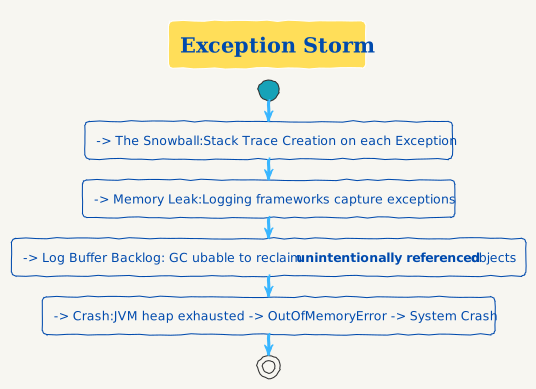
Example to recreate exception storm
The program floods the application with 100,000 “INVALID INPUT” strings, causing an error each time. The application attempts to capture and record each error, but the vast quantity overwhelms its capacity, leading to a system crash.
public class App {
    private static final Logger logger = LogManager.getLogger(App.class);

    private static List<String> giganticInValidInput() {
        // Returns a list of 100,000 invalid strings
        List<String> list = new ArrayList<>();
        for (int i = 0; i < 100_000; i++) {
            list.add(String.format("%d: INVALID INPUT", i));
        }
        return list;
    }
    private void processInput(String input) throws InvalidParameterException {
        if (input.contains("INVALID")) {
            throw new InvalidParameterException("Input cannot be Invalid");
        }
    }
    private void simulateWorkload() {
        List<String> inputs = giganticInValidInput();
        for(String input: inputs) {
            try {
                processInput(input);
            } catch (InvalidParameterException e) {
                logger.error("Found Invalid input", e);
            }
        }
    }
    public static void main(String[] args) {
        App app = new App();
        logger.info("Application started!");
        app.simulateWorkload();
        logger.info("Application completed");
    }
}Best Practices & Solutions
- Fix the code: Avoid Throwing exceptions in hot loop and hot APIs. This will ensure exception storms are not triggered.
- Improve logging:
- Reduce size and frequency of logging. Instead of logging every line log a message every N errors.
- Instead of adding the exception to the logs log just the
e.getMessage()when possible. You probably do not want to lose debugging information is lot of circumstances. - Ensure Logging framework is correctly configured to handle high traffic.
- Break the long stack traces: Similar to 2.2 instead of just throwing errors you can break the chain copy the message into a new clean error. Use this with caution too and this will lose debugging info too.
- Monitoring and Alarming: Setup monitors on heap space, exception count and have proper alarming.